


Block Components
Learn how to use the block components.
Overview
In this guide, you'll learn how to use block components to create a ticking block.
For a more complete reference, you may also want to review FarmingSystems.Ticking, as much of the underlying logic is based on its implementation.
Steps
1. ExampleBlock - holds block behavior
public class ExampleBlock implements Component<ChunkStore> {

    public static final BuilderCodec CODEC = BuilderCodec.builder(ExampleBlock.class, ExampleBlock::new).build();

    // Components usually require a copy constructor as well but since we don't actually hold any data in this component this is not neccessary
    public ExampleBlock() { }

    public static ComponentType getComponentType() {
        return ExamplePlugin.get().getExampleBlockComponentType();
    }

    @Nullable
    public Component<ChunkStore> clone() {
        return new ExampleBlock();
    }
}
ExampleBlock is a custom component that stores the behavior and data for your ticking block. Here, it simply places an Ice Block at x + 1 relative to its current position when it ticks.
2. ExampleInitializer - marks blocks as ticking when placed
public class ExampleInitializer extends RefSystem {

    @Override
    public void onEntityAdded(@Nonnull Ref ref, @Nonnull AddReason reason, @Nonnull Store store, @Nonnull CommandBuffer commandBuffer) {
        BlockModule.BlockStateInfo info = (BlockModule.BlockStateInfo) commandBuffer.getComponent(ref, BlockModule.BlockStateInfo.getComponentType());
        if (info == null) return;

        ExampleBlock generator = (ExampleBlock) commandBuffer.getComponent(ref, ExamplePlugin.get().getExampleBlockComponentType());
        if (generator != null) {
            int x = ChunkUtil.xFromBlockInColumn(info.getIndex());
            int y = ChunkUtil.yFromBlockInColumn(info.getIndex());
            int z = ChunkUtil.zFromBlockInColumn(info.getIndex());

            WorldChunk worldChunk = (WorldChunk) commandBuffer.getComponent(info.getChunkRef(), WorldChunk.getComponentType());
            if (worldChunk != null) {
				worldChunk.setTicking(x, y, z, true);
            }
        }
    }

    @Override
    public void onEntityRemove(@Nonnull Ref ref, @Nonnull RemoveReason reason, @Nonnull Store store, @Nonnull CommandBuffer commandBuffer) {
    }

    @Override
    public Query getQuery() {
        return Query.and(BlockModule.BlockStateInfo.getComponentType(), ExamplePlugin.get().getExampleBlockComponentType());
    }
}
ExampleInitializer is a RefSystem that reacts when block entities with the ExampleBlock component are added or removed. This is crucial for marking blocks as ticking when they're first placed.
Key Points:
- Tells the game that this block should tick, allowing
ExampleSystemto process it.
worldChunk.setTicking(x, y, z, true);3. ExampleSystem - handles ticking
public class ExampleSystem extends EntityTickingSystem {

    public void tick(float dt, int index, @Nonnull ArchetypeChunk archetypeChunk, @Nonnull Store store, @Nonnull CommandBuffer commandBuffer) {
        BlockSection blocks = (BlockSection) archetypeChunk.getComponent(index, BlockSection.getComponentType());

        assert blocks != null;

        if (blocks.getTickingBlocksCountCopy() != 0) {
            ChunkSection section = (ChunkSection) archetypeChunk.getComponent(index, ChunkSection.getComponentType());

            assert section != null;

            BlockComponentChunk blockComponentChunk = (BlockComponentChunk) commandBuffer.getComponent(section.getChunkColumnReference(), BlockComponentChunk.getComponentType());

            assert blockComponentChunk != null;

            blocks.forEachTicking(blockComponentChunk, commandBuffer, section.getY(), (blockComponentChunk1, commandBuffer1, localX, localY, localZ, blockId) -> {
                Ref<ChunkStore> blockRef = blockComponentChunk.getEntityReference(ChunkUtil.indexBlockInColumn(localX, localY, localZ));
                if (blockRef == null) {
                    return BlockTickStrategy.IGNORED;
                } else {
                    ExampleBlock exampleBlock = (ExampleBlock) commandBuffer1.getComponent(blockRef, ExampleBlock.getComponentType());
                    if (exampleBlock != null) {
                        WorldChunk worldChunk = (WorldChunk) commandBuffer.getComponent(section.getChunkColumnReference(), WorldChunk.getComponentType());
                        World world = worldChunk.getWorld();

                        int globalX = localX + (worldChunk.getX() * 32);
                        int globalZ = localZ + (worldChunk.getZ() * 32);

                        // We need to execute setBlock on the world thread as you cannot call store functions from a system
                        // This is because of the architecture of the server, depending on your needs you can also use the CommandBuffer
                        world.execute(() -> {
                            world.setBlock(globalX + 1, localY, globalZ, "Rock_Ice");
                        });

                        return BlockTickStrategy.CONTINUE;

                    } else {
                        return BlockTickStrategy.IGNORED;
                    }
                }
            });
        }
    }

    @Nullable
    public Query getQuery() {
        return Query.and(BlockSection.getComponentType(), ChunkSection.getComponentType());;
    }
}
ExampleSystem is an EntityTickingSystem that runs every tick to execute the logic for all ticking blocks with the ExampleBlock component.
Key Points:
- Get the block component
ExampleBlock exampleBlock = (ExampleBlock) commandBuffer.getComponent(blockRef, ExampleBlock.getComponentType());- Convert local chunk coordinates to world coordinates
int globalX = localX + (worldChunk.getX() * 32);
int globalZ = localZ + (worldChunk.getZ() * 32);- Run the block logic
exampleBlock.runBlockAction(globalX, localY, globalZ, worldChunk.getWorld());- Keep the block ticking in the next tick
return BlockTickStrategy.CONTINUE;4. ExamplePlugin - registers components and systems
public class ExamplePlugin extends JavaPlugin {
    private static ExamplePlugin instance;
    private static final HytaleLogger LOGGER = HytaleLogger.forEnclosingClass();
    private ComponentType<ChunkStore, ExampleBlock> exampleBlockComponentType;

    public static ExamplePlugin get() {
        return instance;
    }

    public ExamplePlugin(@Nonnull JavaPluginInit init) {
        super(init);
        LOGGER.atInfo().log("Hello from " + this.getName() + " version " + this.getManifest().getVersion().toString());
    }

    @Override
    protected void setup() {
        instance = this;
        LOGGER.atInfo().log("Setting up plugin " + this.getName());
        this.exampleBlockComponentType = this.getChunkStoreRegistry().registerComponent(ExampleBlock.class, "ExampleBlock", ExampleBlock.CODEC);
    }

	@Override
	protected void start() {
		this.getChunkStoreRegistry().registerSystem(new ExampleSystem());
		this.getChunkStoreRegistry().registerSystem(new ExampleInitializer());
	}

    public ComponentType<ChunkStore, ExampleBlock> getExampleBlockComponentType() {
        return this.exampleBlockComponentType;
    }
}
5. Configure In-Game
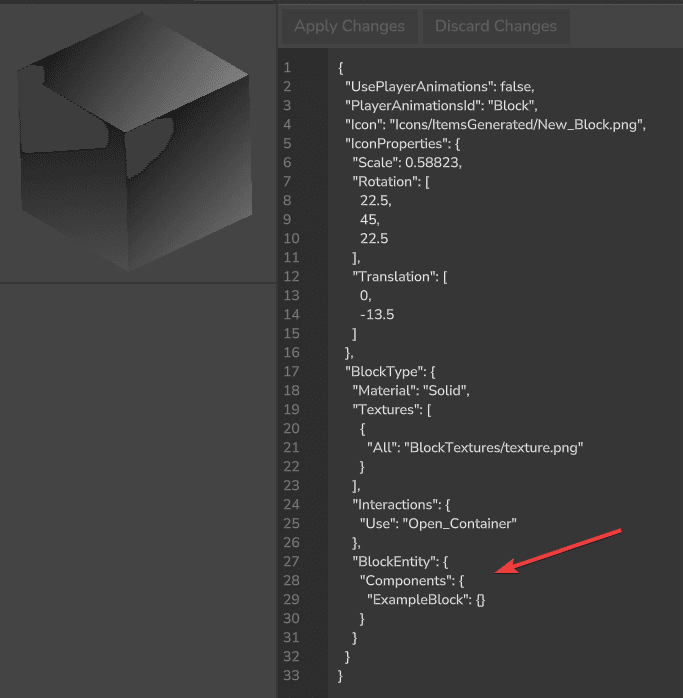
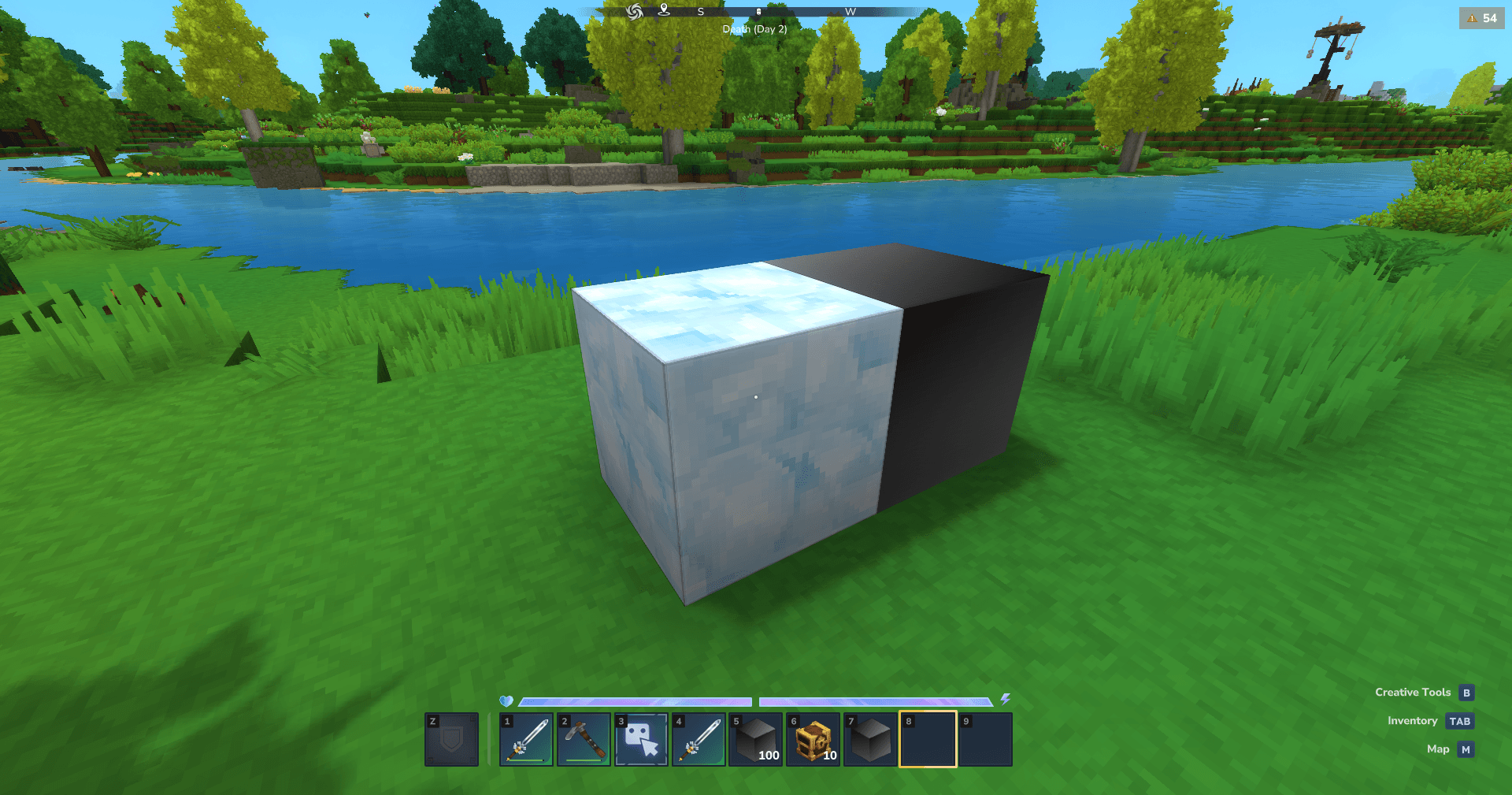
With this logic, the block will now continuously place an Ice Block at the coordinates x + 1 relative to its current position every time it ticks.
Common Issues
NullPointerException on Startup
Error message:
java.lang.NullPointerException: Cannot invoke "com.hypixel.hytale.component.query.Query.validateRegistry(com.hypixel.hytale.component.ComponentRegistry)" because "query" is nullCause: This error occurs when your module is loaded before the required Hytale modules.
Fix:
Add EntityModule and BlockModule as dependencies in your manifest.json to ensure proper load order.
"Dependencies": {
  "Hytale:EntityModule": "*",
  "Hytale:BlockModule": "*"
}