


Modtale
Visual guide to publishing and managing Hytale projects on Modtale.
Publishing on Modtale
Modtale is the Hytale community repository for plugins, data assets, art assets, worlds, and modpacks.
This guide follows the current web editor publishing flow: create a draft, complete the page, upload a version, add relationships, submit for review, and automate repeat releases when useful. It does not cover the separate modpack creation workflow.
Quick Checklist
Have these ready before opening the upload flow:
| Need | Current rule |
|---|---|
| Account | Signed in; verified email for publishing actions and API keys |
| Project file | 100 MB max |
| Version | Strict SemVer, for example 1.0.0, 1.0.0-rc.1, or 1.0.0+build.5 |
| Game support | Pick one or more Hytale versions from Modtale's catalog |
| Icon | Square, 1:1 |
| Banner | Wide, 3:1 |
| Gallery | PNG, JPEG, or WEBP images at 16:9; up to 20 items |
| Metadata | Title, 10-250 character summary, tags, license, saved changes |
| Optional automation | API key, project ID, and the needed project/version permissions |
1. Create the Draft
Open modtale.net/upload and choose the project type.
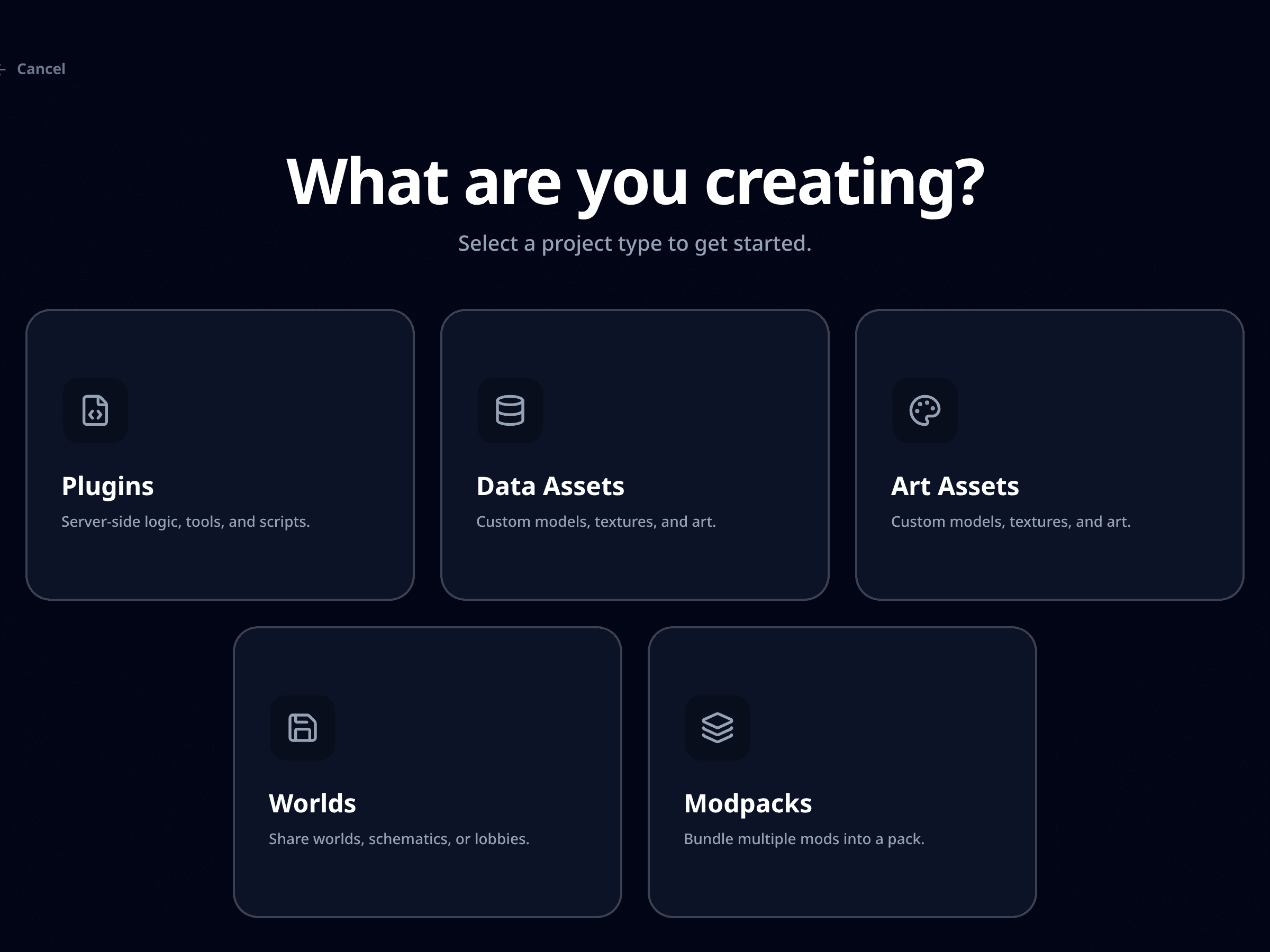
Use the type that matches the artifact you plan to publish:
| Type | Uploads |
|---|---|
| Plugins | .jar |
| Data Assets | .jar or .zip |
| Art Assets | .jar or .zip |
| Worlds | .zip |
| Modpacks | Separate workflow, not covered here |
Then choose the owner and give the project its first public text.
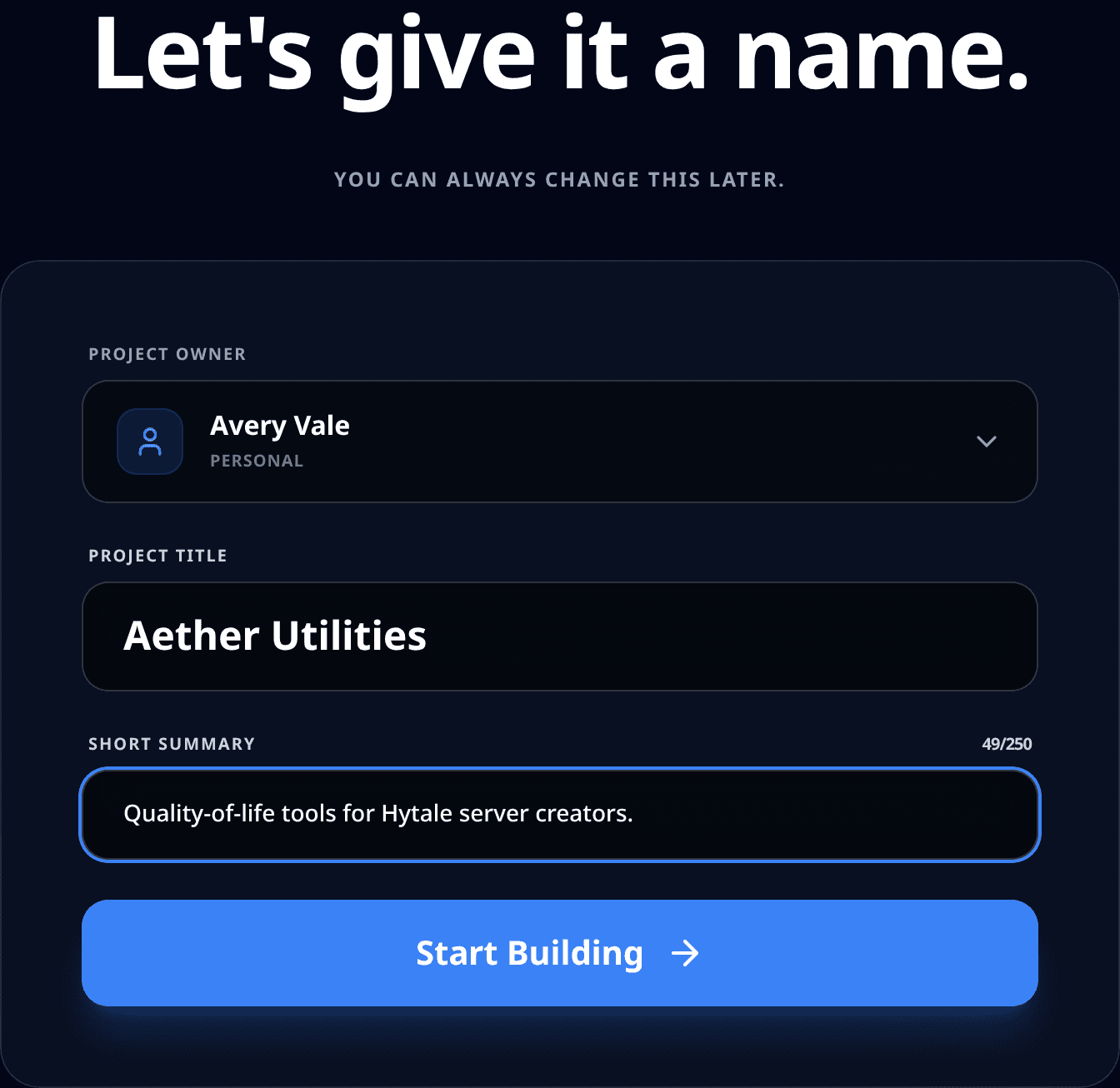
Fill in:
- Owner: your account or an organization you can publish under.
- Title: the public project name.
- Short Summary: one readable sentence, 10-250 characters.
2. Complete the Details
The editor groups the publishing workflow into tabs. The header actions are View Project, Submit, and Save.
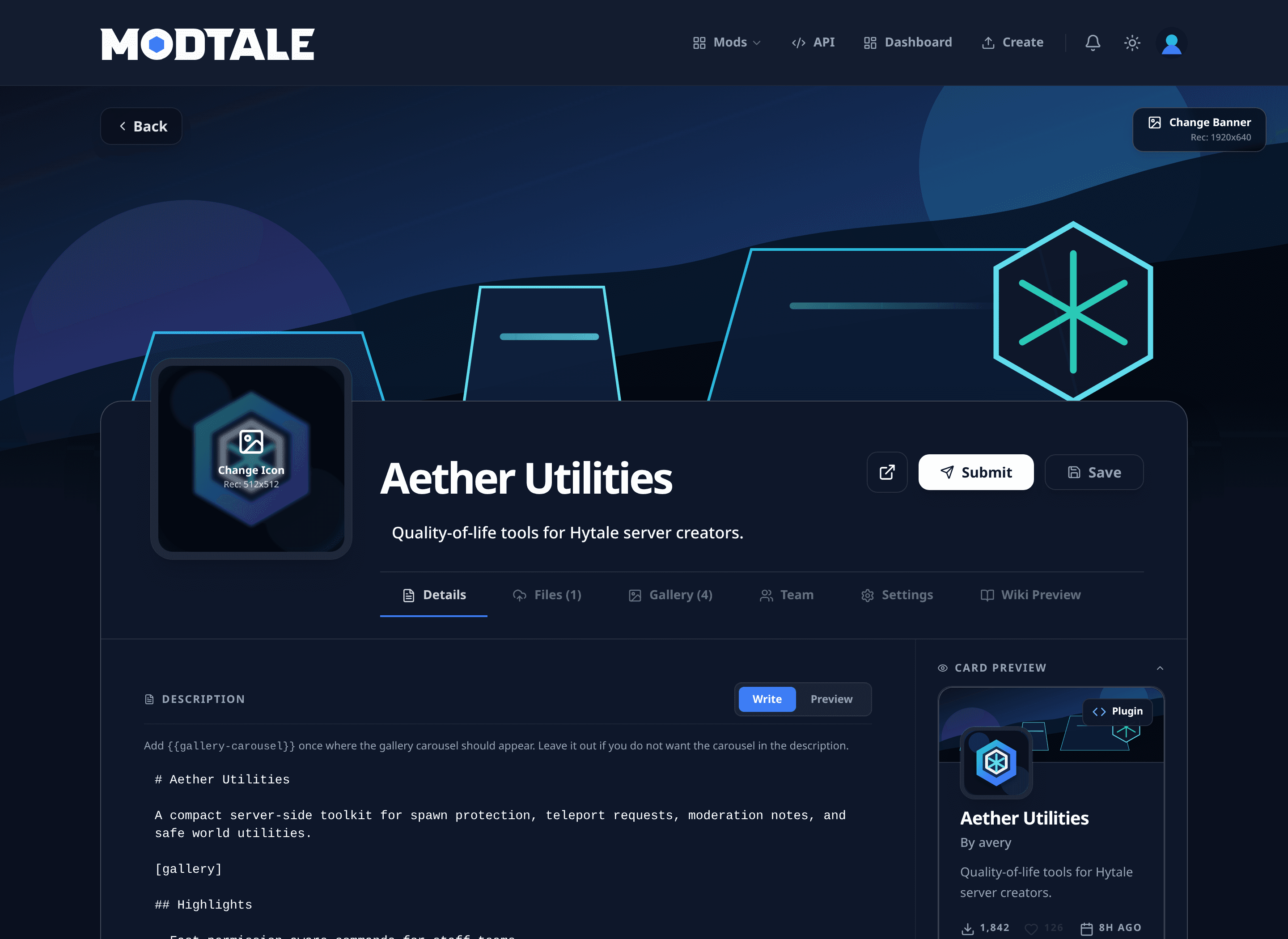
Use the Details tab for the page users read before downloading:
| Area | What to add |
|---|---|
| Description | Markdown overview, setup notes, supported game versions, known conflicts, and [gallery] where media should appear inline |
| Icon | Square project mark; avoid tiny text |
| Banner | Readable scene, render, or project image |
| Tags | At least one allowed tag from the picker |
| Links | Website, wiki, issue tracker, Discord, or source repository |
| Repository URL | HTTPS GitHub, GitLab, or Codeberg URL |
| License | Required before submit; custom license needs a URL |
Save after edits. The submit check blocks unsaved required changes.
Submitted projects become read-only while pending review. Use Revert to Draft if you need to edit before review finishes and the action is available to you.
3. Upload a Version
Open Files and add the release artifact.
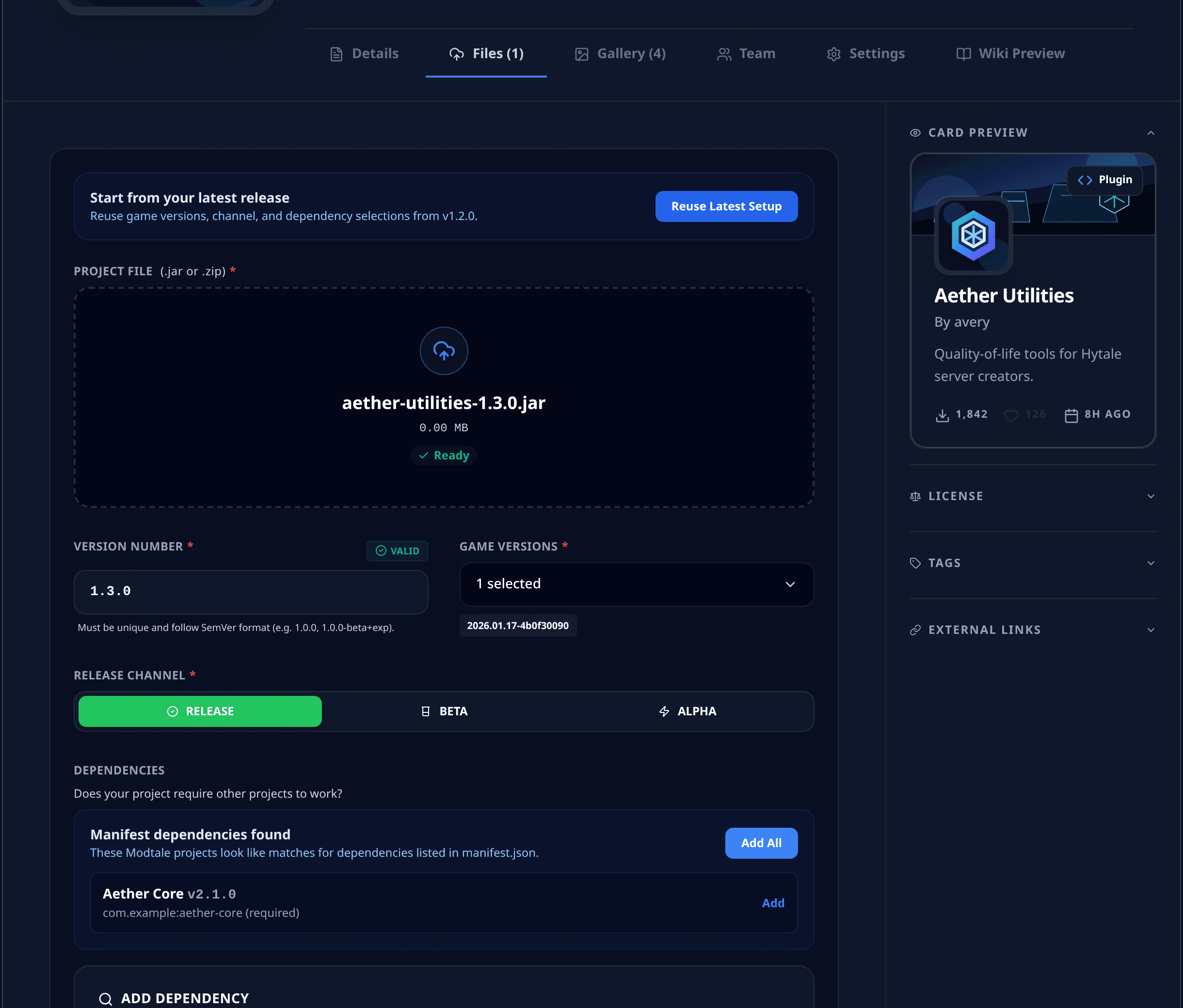
Set the version fields carefully:
| Field | Notes |
|---|---|
| Project File | Drag in the .jar or .zip; max 100 MB |
| Version Number | Unique strict SemVer for this project |
| Game Versions | Select every compatible Hytale version |
| Release Channel | Release, Beta, or Alpha |
| Changelog | Markdown notes for this exact version |
For plugin .jar uploads, Modtale can inspect manifest.json and suggest:
- Version number.
- Matching game version.
- Dependency matches.
Review suggestions before accepting them. The editor stores version relationships as structured metadata, which helps users and tools install compatible projects together.
4. Add Dependencies
Use Dependencies when this version needs another Modtale project.
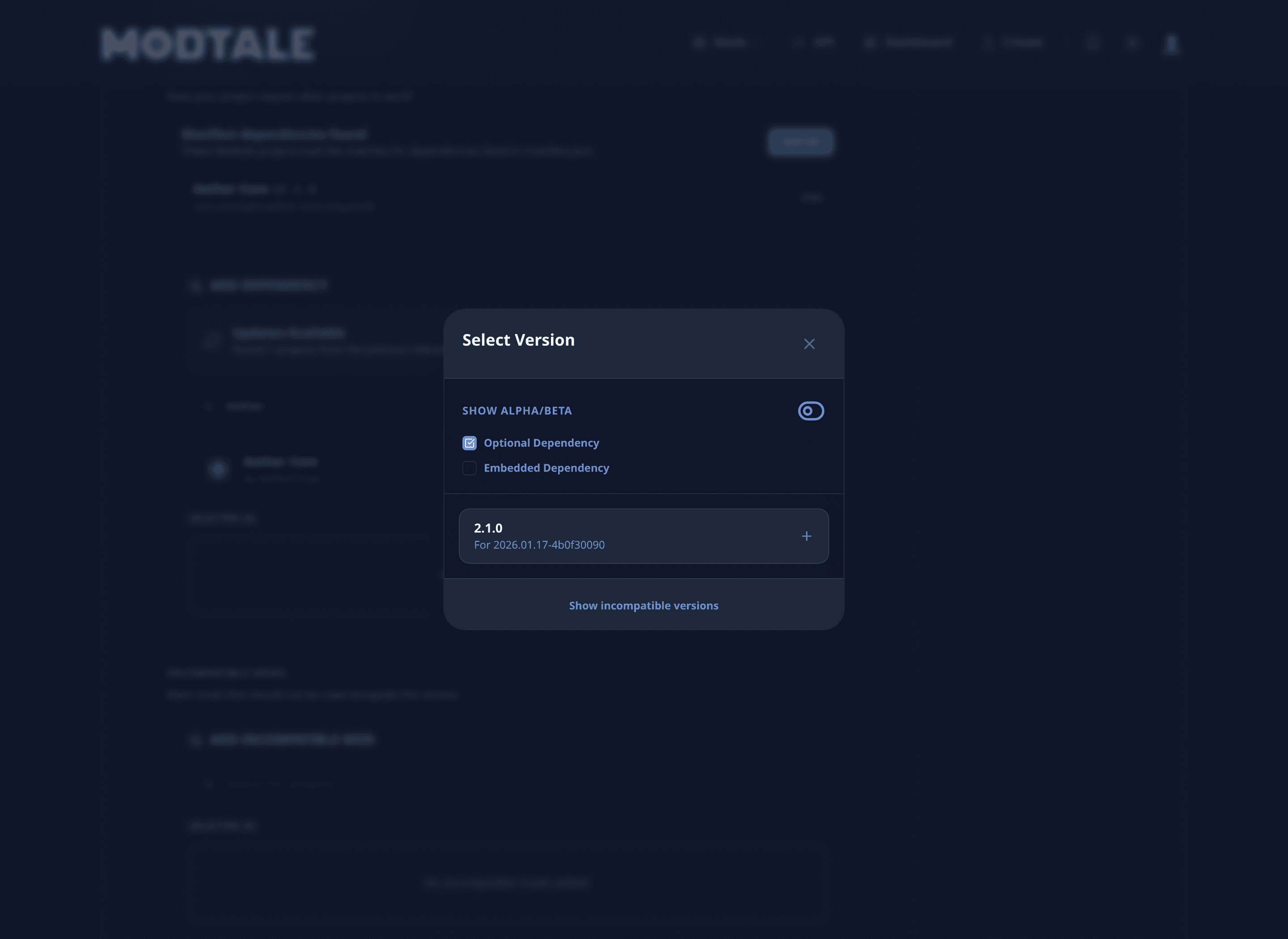
Dependency flow:
| Step | Action |
|---|---|
| Search | Find the required project by name |
| Select | Pick a version compatible with the selected game version |
| Mark optional | Use when the dependency unlocks extra behavior but is not required |
| Mark embedded | Use when the dependency is already bundled into the artifact |
| Import updates | Reuse and update dependency choices from a previous release when offered |
Use Incompatible Mods for projects that should not be installed alongside this version. This is useful when two projects patch the same behavior, replace the same content, or cause each other to stop functioning altogether.
5. Submit for Review
Use Submit when the page and first version are ready.
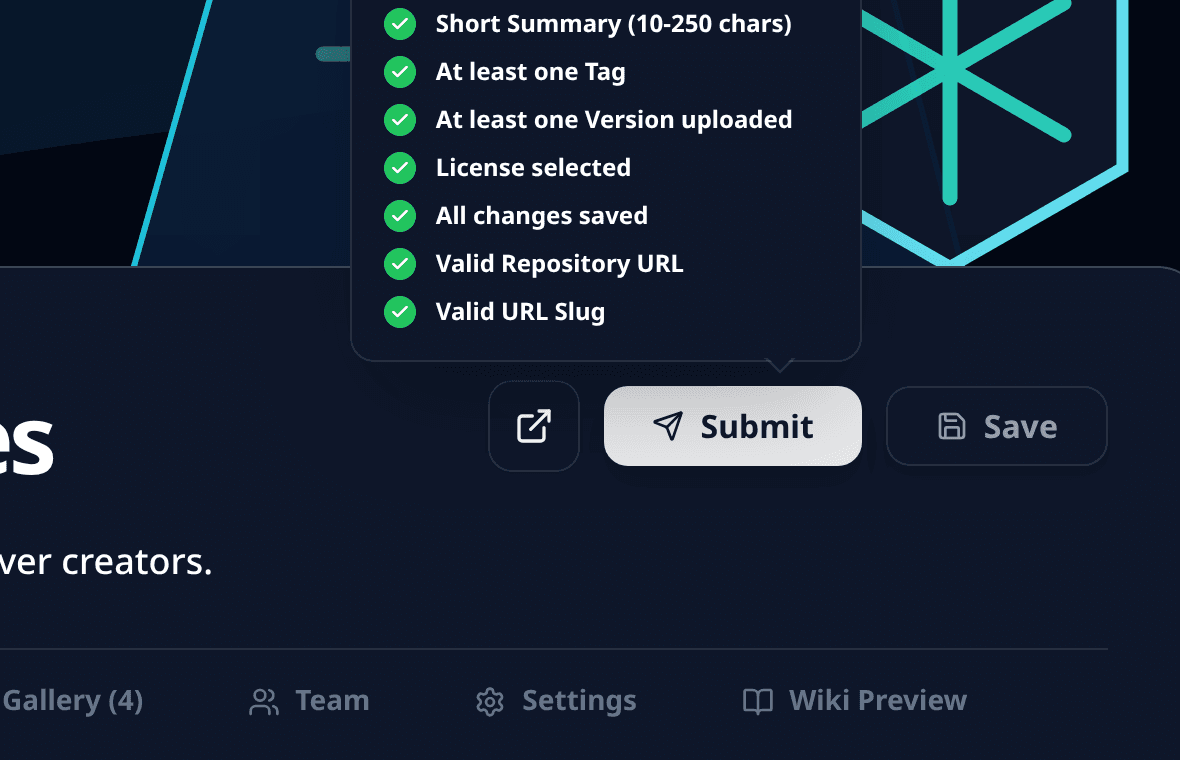
The checklist expects:
- Title.
- Summary between 10 and 250 characters.
- At least one tag.
- At least one uploaded version.
- License.
- Saved changes.
- Valid repository URL, if present.
- Valid slug, if present.
- Description under the current length limit.
After submit, the project enters review. If approved, it can become public. If rejected, apply the feedback, save, and submit again.
6. Add Gallery Media
Open Gallery to make the project understandable at a glance.
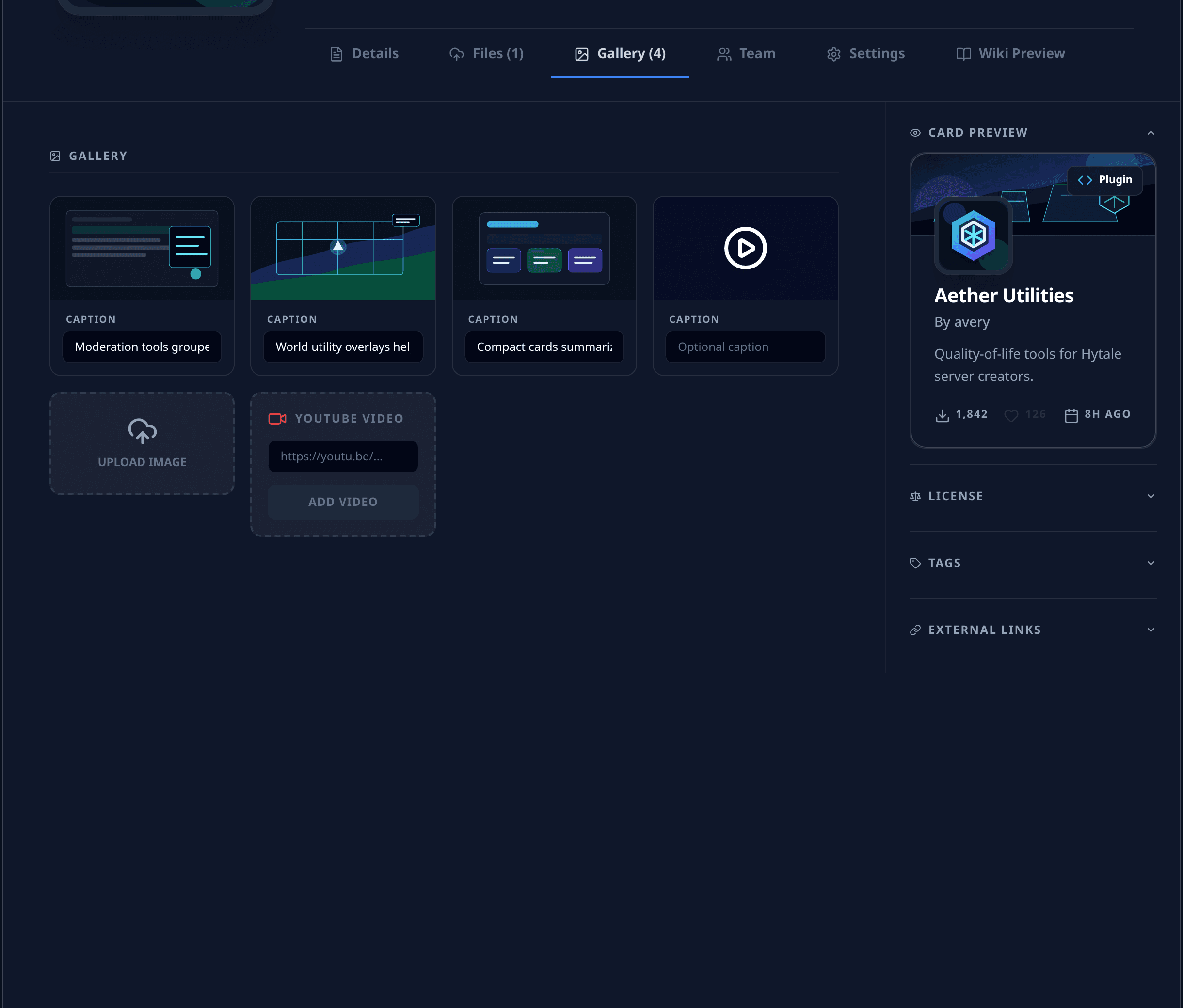
Gallery tools:
| Feature | Notes |
|---|---|
| Image upload | PNG, JPEG, or WEBP at 16:9 |
| YouTube URL | Add videos alongside images |
| Captions | Up to 240 characters |
| Embed copy | Copy an embed snippet for media |
| Delete | Remove stale or low-signal media |
Good gallery items show the actual result: UI, commands, before/after visuals, generated terrain, world locations, models, textures, or setup screens.
7. Project Settings
Use Settings for project-level controls.
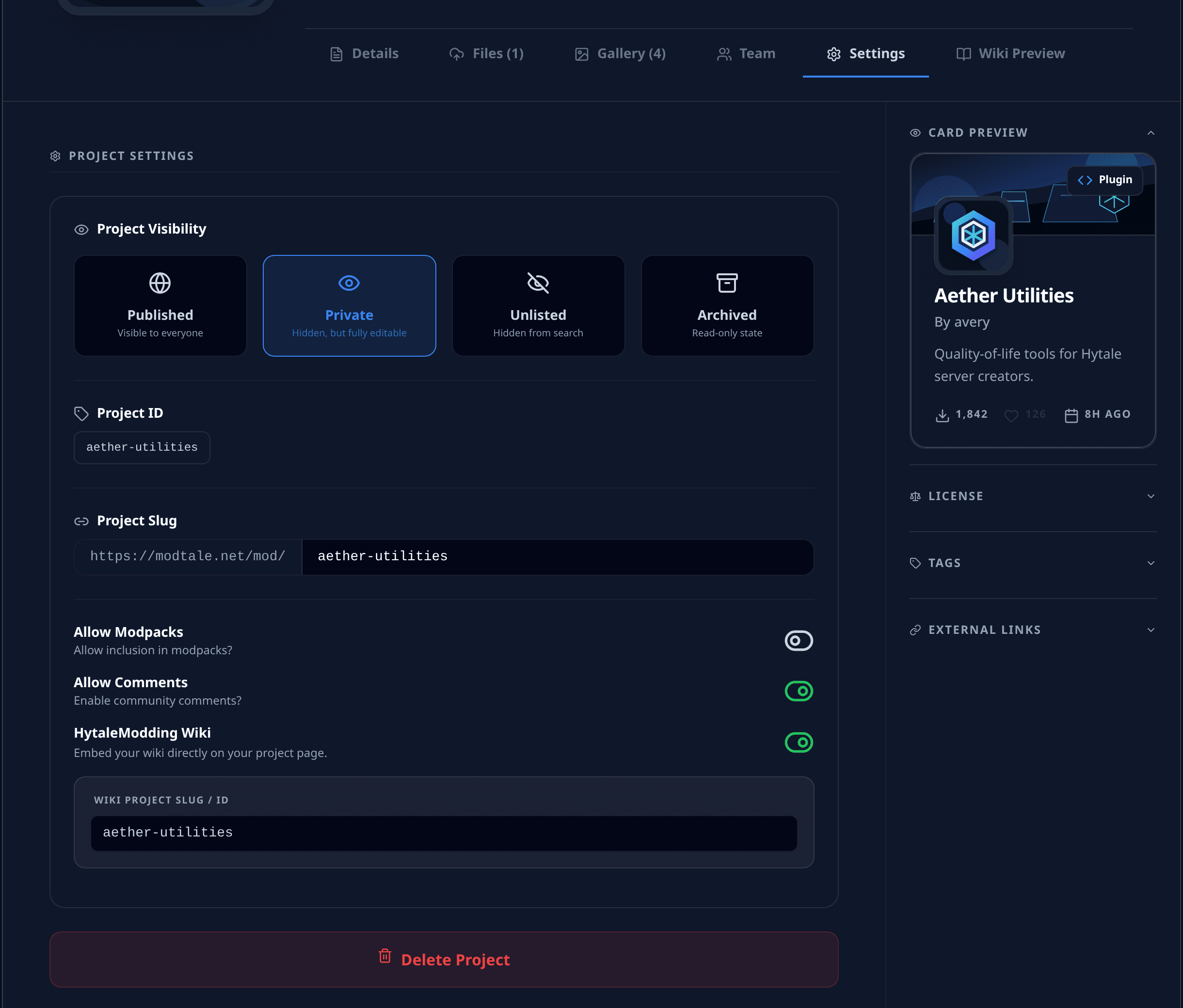
Main controls:
| Setting | Use |
|---|---|
| Published | Visible to everyone |
| Private | Hidden and editable |
| Unlisted | Hidden from search; accessible by link |
| Archived | Read-only historical state |
| Project ID | Stable ID for API calls, support, and automation |
| Slug | Custom URL segment; 3-50 lowercase letters, numbers, and dashes |
| Comments | Enable or disable community comments |
| Allow Modpacks | Let other creators include this project in a modpack |
| HytaleModding Wiki | Embed a wiki project by slug or ID |
| Delete | Remove only when you really mean it |
Pending projects cannot freely move through every visibility state while review is active.
8. Invite Contributors
Use Team when other maintainers need access.
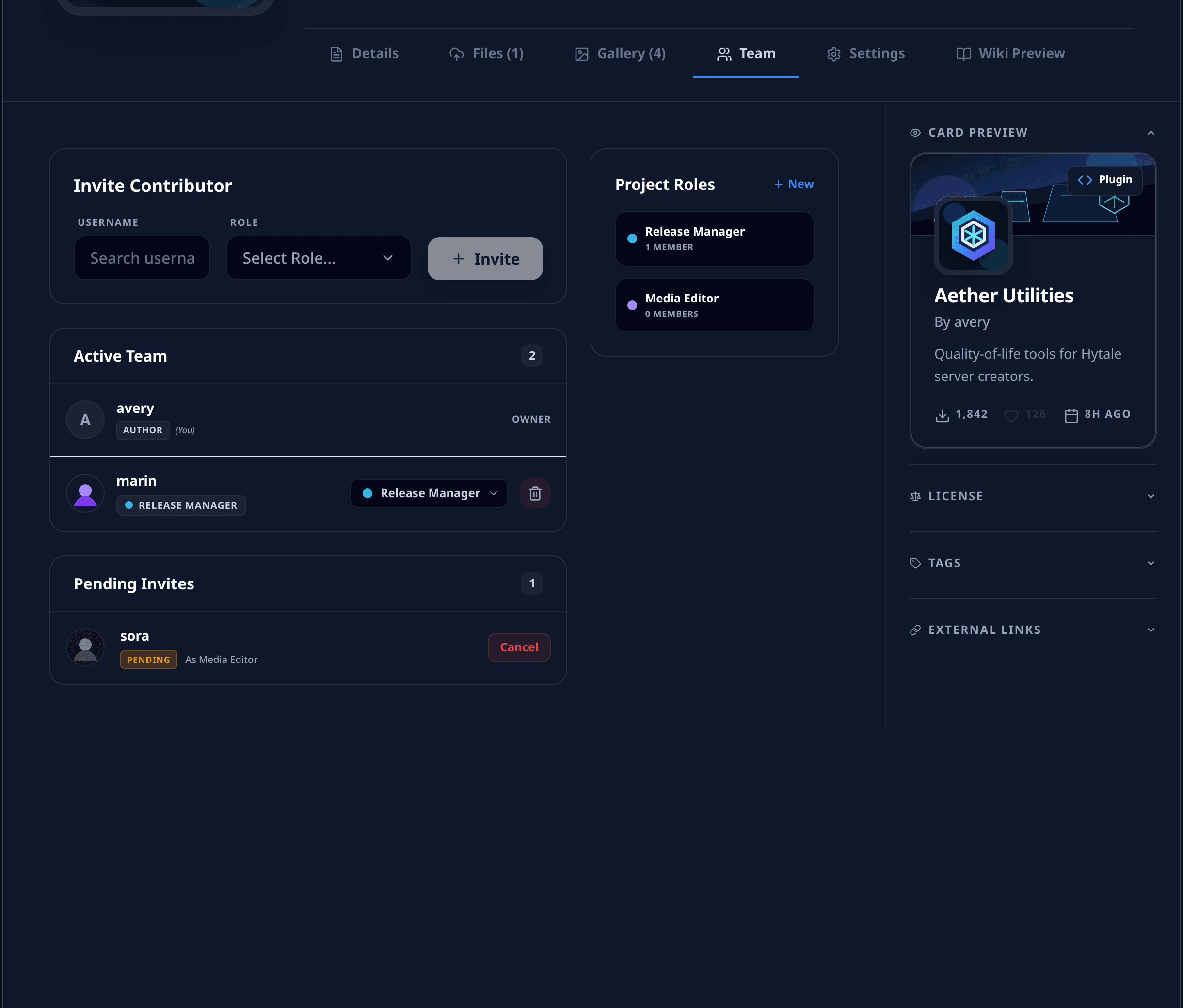
Contributor workflow:
| Step | Action |
|---|---|
| Create role | Choose a name, color, and permissions |
| Invite user | Search by username and assign a role |
| Review status | Track active members and pending invites |
| Adjust access | Update roles, cancel invites, remove members, or leave |
Permission groups include:
- Project Management: metadata, icon, banner, deletion.
- Versions & Releases: upload, edit, delete, download.
- Visibility & Publishing: submit, revert, publish, unlist, archive.
- Community & Media: gallery and comment actions.
- Team Management: invites, role changes, transfers.
Grant the smallest useful role. Release maintainers usually need version and submit permissions; media contributors often only need metadata, icon, banner, and gallery access.
9. API Keys and Automation
Open Developer Settings from your account menu to create API keys.
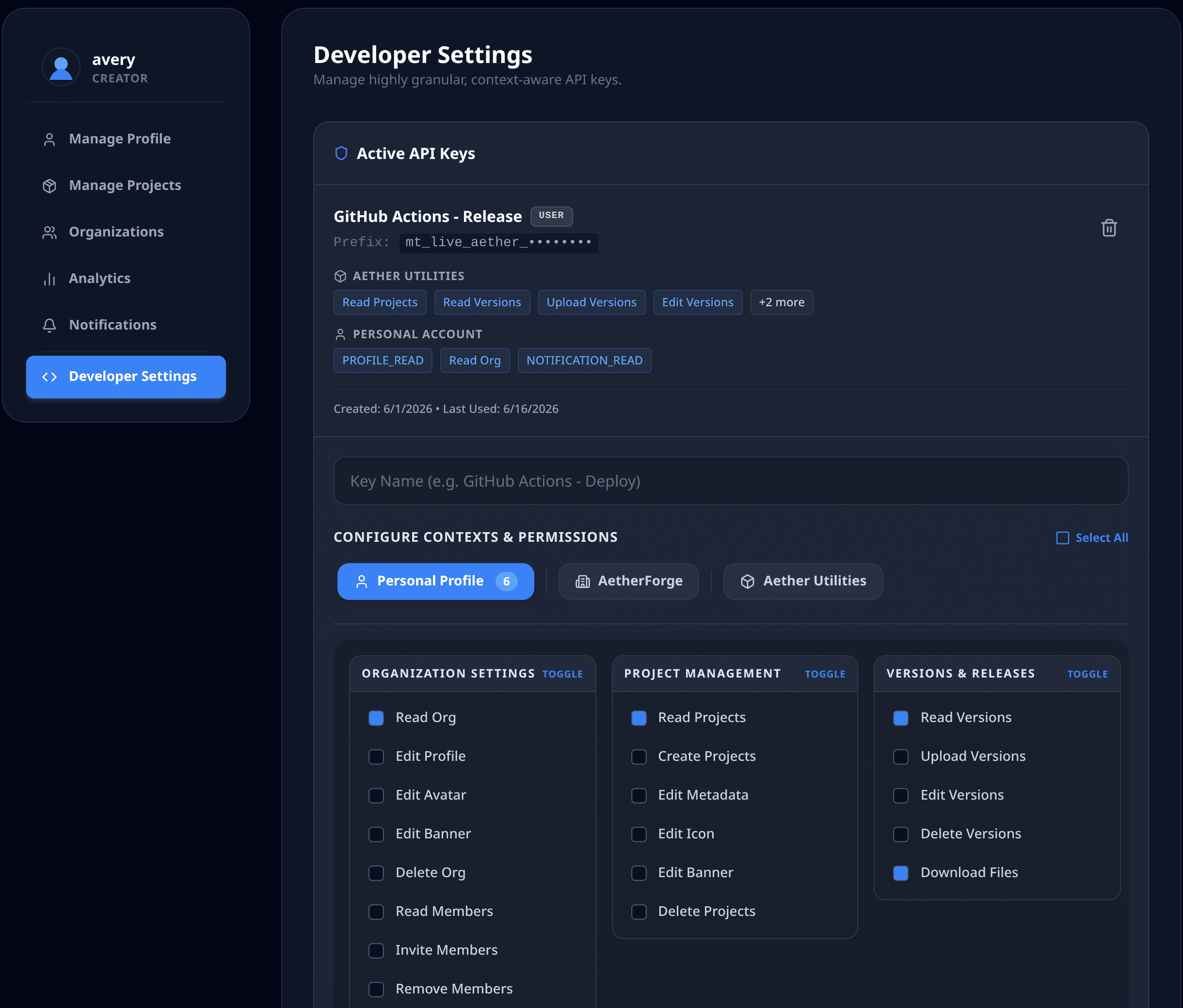
API key rules:
| Rule | Notes |
|---|---|
| Limit | Up to 10 active keys per user |
| Scope | Personal, organization, or project context |
| Permissions | Choose only the groups your tool needs |
| Secret display | The full key is shown once |
| Auth header | Send X-MODTALE-KEY to /api/v1 |
Useful endpoint families:
POST   /api/v1/projects
PUT    /api/v1/projects/{id}
POST   /api/v1/projects/{id}/submit
POST   /api/v1/projects/{id}/revert
POST   /api/v1/projects/{id}/archive
POST   /api/v1/projects/{id}/unlist
POST   /api/v1/projects/{id}/private
POST   /api/v1/projects/{id}/publish

POST   /api/v1/projects/{id}/versions
PUT    /api/v1/projects/{id}/versions/{versionId}
DELETE /api/v1/projects/{id}/versions/{versionId}
POST   /api/v1/projects/{id}/versions/dependency-suggestions

PUT    /api/v1/projects/{id}/icon
PUT    /api/v1/projects/{id}/banner
POST   /api/v1/projects/{id}/gallery
POST   /api/v1/projects/{id}/gallery/youtube
PUT    /api/v1/projects/{id}/gallery/caption
DELETE /api/v1/projects/{id}/gallery
Example:
curl \
  -H "X-MODTALE-KEY: mt_live_your_key_here" \
https://modtale.net/api/v1/projects/{project-id}/versionsTreat API keys like passwords. Store them in a secret manager, never commit them, and revoke leaked keys immediately.
Reference Repositories
Use these when you want the upload workflow scripted:
| Project | Best for |
|---|---|
| AzureDoom/HytalePublisher | Gradle releases with Modtale credentials, project ID, release type, changelog file, dependency declarations, game-version selectors, and optional replacement of an existing version |
| Modtale/modtale-example | Direct API examples, GitHub Actions templates, Gradle and Maven samples, a small Go uploader, and examples for resolving Modtale downloads as build dependencies |
Recommended automation setup:
- Create the Modtale project manually.
- Copy the Project ID from Settings.
- Create a project-scoped API key.
- Store the key in local secrets or CI secrets.
- Publish the built artifact with either HytalePublisher or a direct
/api/v1upload.
Maintenance Rhythm
For each new release:
- Use a new SemVer version.
- Select accurate game versions.
- Update dependencies and incompatibilities.
- Write a focused changelog.
- Refresh gallery media when the visible result changes.
- Submit or wait for review when the workflow requires it.
Troubleshooting
If submit is blocked, open the requirements panel first. It tells you what is missing.
Common fixes:
| Problem | Fix |
|---|---|
| Unsaved changes | Save the editor |
| Missing tags | Pick at least one allowed tag |
| Missing version | Upload the first version |
| Missing license | Select a license or add the custom license URL |
| Bad summary | Keep it 10-250 characters |
| Bad repository URL | Use HTTPS GitHub, GitLab, or Codeberg |
| Bad slug | Use lowercase letters, numbers, and dashes only |
| Upload rejected | Check file size, extension, SemVer, and selected game versions |
| API request rejected | Check X-MODTALE-KEY, context permissions, project ID, and the OpenAPI schema |
If you need help, gather the project ID, the action you tried, and the exact editor or API error before contacting the Modtale team.