



8 - Feeding the Ogre
Lest we forget, there was another significantly more complex idle behaviour we have to implement:
- Standing guard (we already did this!)
- Napping for a while (this one too!)
- Going off to find some food.
This one might be a bit trickier. When we pick this behaviour we need to scan the area to see if there is any food. If we find it, we head over, pretend to grab it, and then set to eating.
But what if we don't find any food? We should probably still pretend to go looking for it - it's not like this ogre is omniscient and already knows there's no food where it expects it because the sensor said there wasn't...right?
We start by creating our .FindFood substate immediately after .Guard.
{
	"Sensor": {
		"Type": "State",
		"State": ".Guard"
	},
	"Instructions": [ ... ],
},
{
	"Sensor": {
		"Type": "State",
		"State": ".FindFood"
	},
	"Instructions": [ ... ]
}
We then add it to our list of random actions.
"Type": "Random",
"Actions": [
    {
        "Weight": 70,
        "Action": {
            "Type": "State",
            "State": ".Guard"
        }
    },
    {
        "Weight": 20,
        "Action": {
            "Type": "State",
            "State": "Sleep"
        }
    },
    {
        "Weight": 10,
        "Action": {
            "Type": "State",
            "State": ".FindFood"
        }
    }
]
Next we want to perform the actual search for food. But what is food? And not in a philosophical sense. What kinds of food does this ogre look for? This is another point where we might want to have a chat with the designers. Do they want it to go after multiple different things? Or is there one particular type of food a goblin ogre is interested in?
A quick discussion with our designers reveals we've been working under an incorrect assumption and highlights the importance of ensuring that we thoroughly understand both the contents of the design specifications, and the intent behind them. This ogre is meant to be a guard and shouldn't leave his post. He should never actively set off to find food, but rather whip something out of a pocket and eat it on the spot.
Okay. That makes things significantly easier! We can now cross off one of our idle substates:
- .Default (pick the random behaviour state to switch to)
- .Guard (stand guard)
.FindFood (go search for some nearby food if it exists)- .EatRat (murder an innocent nearby rat - we're still ignoring this for now)
So let's remove .FindFood and jump straight to Eat, adding the same logic we added to the other idle states. We also need to remember to update the reference in the list of random actions so that it points to the correct state!
{
  "Sensor": {
    "Type": "State",
    "State": "Eat"
  },
  "Instructions": [
    {
      "ActionsBlocking": true,
      "Actions": [
        {
          "Type": "Timeout",
          "Delay": [5, 10]
        },
        {
          "Type": "State",
          "State": "Idle"
        }
      ]
    }
  ]
}
We don't actually know for sure what food this ogre has in his pockets and it's probably something that might get changed in the future, or be nice to make easily changeable in variants.
To accommodate that, let's add an EatItem parameter and accompanying description to the parameters block.
"Parameters": {
    "Appearance": {
        "Value": "Bear_Grizzly",
        "Description": "Model to be used"
    },
    "EatItem": {
        "Value": "Food_Beef_Raw",
        "Description": "The item this NPC will find when it rummages for food"
    },
    "DropList": {
        "Value": "Empty",
        "Description": "Drop Items"
    }
}
Now we just need to set up another PlayAnimation action, much like in the Sleep state, to handle the eating itself.
{
  "Sensor": {
    "Type": "State",
    "State": "Eat"
  },
  "Instructions": [
    {
      "Continue": true,
      "ActionsBlocking": true,
      "Actions": [
        {
          "Type": "Timeout",
          "Delay": [5, 10]
        },
        {
          "Type": "State",
          "State": "Idle"
        }
      ]
    },
    {
      "Reference": "Component_Instruction_Play_Animation",
      "Modify": {
        "Animation": "Eat"
      }
    }
  ]
}
This looks awfully familiar... Could this be something we want to do often in many NPCs? Might we frequently want to play an animation for a specific random duration? I'd say yes, so let's make it a component!
{
  "Type": "Component",
  "Class": "Instruction",
  "Parameters": {
    "_ImportStates": ["Main"],
    "Animation": {
      "Value": "",
      "Description": "The animation to play"
    },
    "Duration": {
      "Value": [3, 5],
      "Description": "The amount of time to wait before transitioning"
    }
  },
  "Content": {
    "Continue": true,
    "Instructions": [
      {
        "Reference": "Component_Instruction_State_Timeout",
        "Modify": {
          "_ExportStates": ["Main"],
          "Delay": { "Compute": "Duration" }
        }
      },
      {
        "Reference": "Component_Instruction_Play_Animation",
        "Modify": {
          "Animation": { "Compute": "Animation" }
        }
      }
    ]
  }
}
I'm calling this one Component_Instruction_Play_Animation_In_State_For_Duration. The Timeout instruction is replaced with the component made in the previous interlude.
Now we need to apply it to both places in the ogre template.
"Sensor": {
    "Type": "State",
    "State": "Eat"
},
"Instructions": [
    {
        "Reference": "Component_Instruction_Play_Animation_In_State_For_Duration",
        "Modify": {
            "_ExportStates": ["Idle.Default"],
            "Animation": "Eat",
            "Duration": [15, 20]
        }
    }
]
Only Eat is pictured here, but you can imagine the same changes being made to Sleep too.
Now why aren't we converting the whole state itself into a component? There's a pretty good reason behind that: we haven't added entity detection yet and we almost surely will. This will need to live in the state alongside the other logic, so we can't exactly push the whole state itself into a component.
There's one last thing we need to do to make this ogre actually eat - take out the food and put it away again. Since we don't want to somehow risk ending up in a state where the ogre is trying to beat its enemies with a chunk of meat or eat its own weapon, we'll do this with state transitions.
"StateTransitions": [
    ...
    {
        "States": [
            {
                "From": ["Idle"],
                "To": ["Eat"]
            }
        ],
        "Actions": [
            {
                "Type": "Inventory",
                "Operation": "SetHotbar",
                "Item": { "Compute": "EatItem" },
                "Slot": 2,
                "UseTarget": false
            },
            {
                "Type": "Inventory",
                "Operation": "EquipHotbar",
                "Slot": 2,
                "UseTarget": false
            }
        ]
    }
]
There's a few important things to note here. This combination of actions will place the item from the EatItem parameter we defined earlier into slot 2 of its hotbar, and then switch to using that slot. We have to define it as UseTarget: false to ensure that it acts on the ogre itself.
By default, NPCs have three hotbar slots, so we've set it to use the last slot for this purpose (slots are numbered starting from zero).
So this handles actually pulling out the food to eat it, but not putting it away again afterwards. Let's add that too.
{
  "States": [
    {
      "From": ["Eat"],
      "To": []
    }
  ],
  "Actions": [
    {
      "Type": "PlayAnimation",
      "Slot": "Status"
    },
    {
      "Type": "Inventory",
      "Operation": "EquipHotbar",
      "Slot": 0,
      "UseTarget": false
    }
  ]
}
Now our ogre will happily pull out a chunk of meat, start eating it, and then put it away again when it's done!
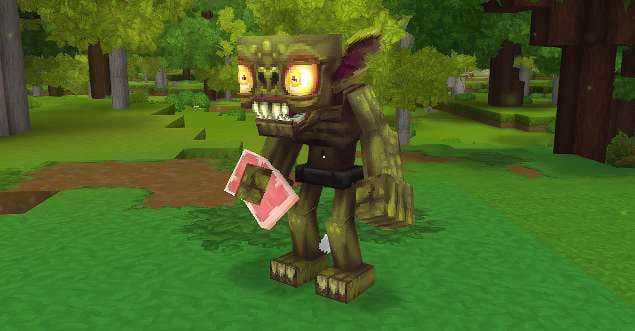
Perfect! The last thing we'll do, just to be sure we don't end up in any strange states if the goblin unloads while eating, is make sure we also switch to the correct weapon at the beginning of the idle state.
{
	"Sensor": {
		"Type": "State",
		"State": "Idle"
	},
	"Instructions": [
		{
			"Continue": true,
			"Sensor": {
				"Type": "Any",
				"Once": true
			},
			"Actions": [
				{
					"Type": "Inventory",
					"Operation": "EquipHotbar",
					"Slot": 0,
					"UseTarget": false
				}
			]
		},
		...
	]
}
With that, we have all the idle behaviours that don't rely on other NPCs set up. We'll deal with that next!