


Patterns
Validates a world location based on its Material composition and other criteria.
BlockType
Checks against the block's Material.
Parameters:
| Name | Type | Description |
|---|---|---|
| Material | block Material |
BlockSet
Checks if the block's Material belongs to the BlockSet.
Parameters:
| Name | Type | Description |
|---|---|---|
| BlockSet | BlockSet slot |
Offset
Offsets the child Pattern by the given vector.
Parameters:
| Name | Type | Description |
|---|---|---|
| Pattern | Pattern slot | |
| Offset | 3D integer vector | The direction to offset the child Pattern in. |
Rotator
Rotates the child Pattern.
Parameters:
| Name | Type | Description |
|---|---|---|
| Pattern | Pattern slot | |
| Rotation | Rotation | The child's rotation. |
Floor
Checks if there is a floor below the position. The Origin validates the position and the Floor validates right under the position. For a simple Floor configuration, use BlockType or BlockSet Patterns in those slots.
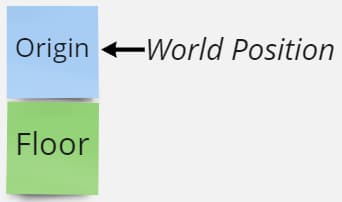
Parameters:
| Name | Type | Description |
|---|---|---|
| Floor | Pattern slot | Validates the block under the Origin position. |
| Origin | Pattern slot | Validates the block at the Origin position. |
Ceiling
Checks if there is a ceiling above the world position. The Origin validates the position and the Ceiling validates right above the position. For a simple Ceiling configuration, use BlockType or BlockSet Patterns in those slots.
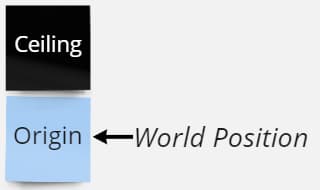
Parameters:
| Name | Type | Description |
|---|---|---|
| Ceiling | Pattern slot | Validates the coordinate above the Origin position. |
| Origin | Pattern slot | Validates the coordinate at the Origin position. |
Wall
Checks if there is a wall next to the world position. For a simple Wall configuration, use BlockType or BlockSet Patterns in those slots. You can specify which directions are valid for the wall using the N, S, E, W string values.
The size of the wall can be 1x1 blocks or larger.
Parameters:
| Name | Type | Description |
|---|---|---|
| Wall | Pattern slot | Validates the coordinate next to the Origin position. |
| Origin | Pattern slot | Validates the coordinate at the Origin position. |
| Directions | list of string directional values | “N”, “S”, “E” or “W”. |
| RequireAllDirections | boolean | If true then all the directions you put in the list need to validate for the Pattern to validate a position. Otherwise only one of the list directions needs to validate. |
Surface
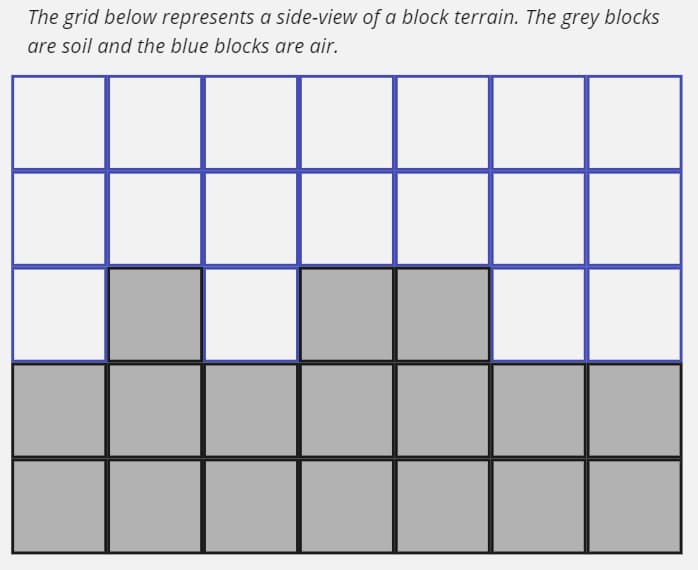
Validates if presented with a surface. A surface is a transition from one set of materials to another. For example, a soil floor to place a large tree on would be a soil surface in an air medium. The surface’s facing, the surface’s area, the medium’s area and the transition gap are configurable.
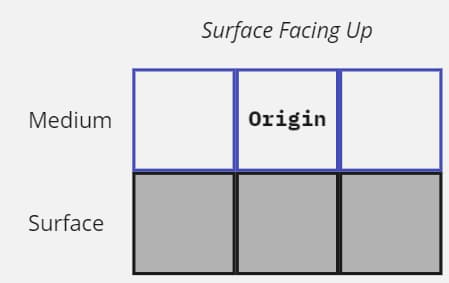
The surface can face 6 orthogonal directions: up, down, north, south, east and west. A surface’s facing direction is determined by its Facings. Furthermore, you can specify more than one facing and use the RequireAllFacings parameter. When a surface faces up, the medium is at the origin and the surface is below the origin. See the diagram below that shows a side-view of an up-facing surface.
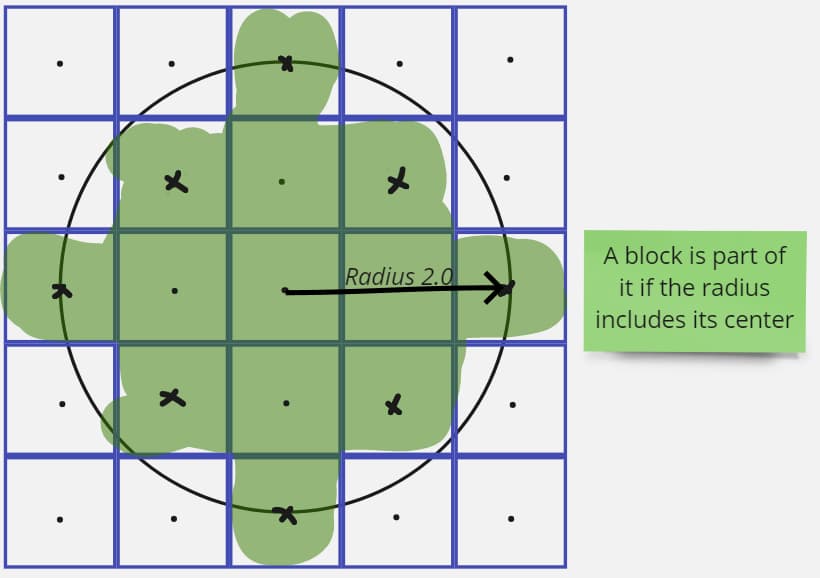
The minimum area required by the surface and medium materials is determined by the SurfaceRadius and the MediumRadius values. A radius of 0.0 would result in an area of 1x1 block, while a radius of 2.0 would result in a disc of a 5 block diameter. The diagram below shows that relationship with a top-down view of an up-facing surface.
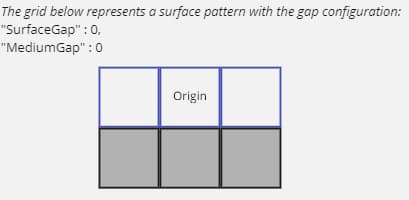
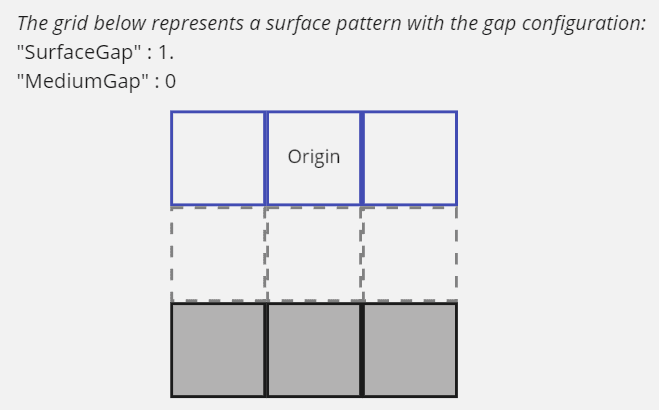
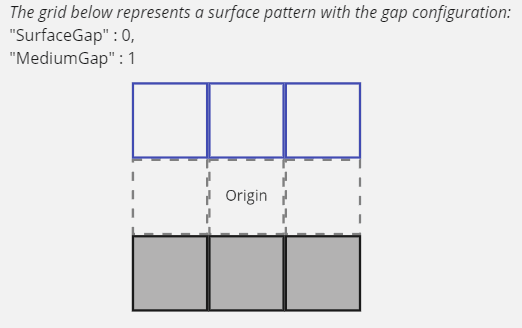
You can make the surface detection less strict by configuring a gap between the medium and the surface. That gap would allow some roughness between the medium and the surface. The diagrams below show how that works.
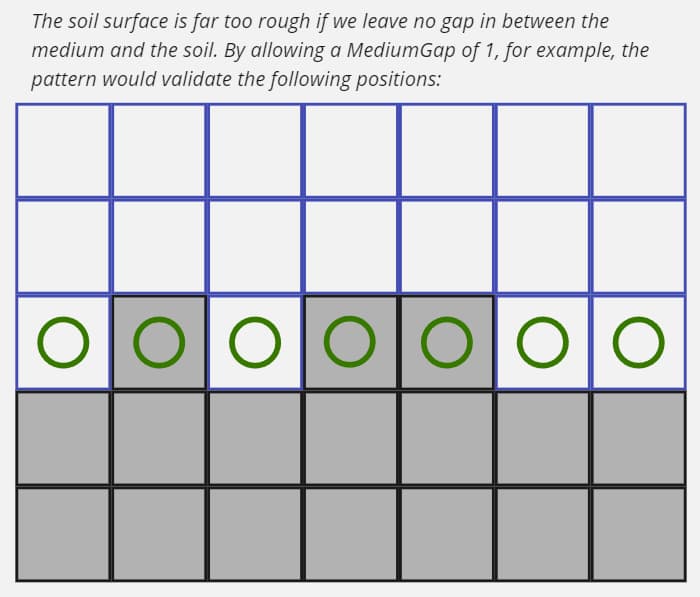
Parameters:
| Name | Type | Description |
|---|---|---|
| Surface | Pattern slot | Validates every block of the surface. |
| Medium | Pattern slot | Validates every block of the medium. |
| SurfaceRadius | positive decimal number (>= 0.0) | Determines the size of the surface area. |
| MediumRadius | positive decimal number (>= 0.0) | Determines the size of the medium area. |
| SurfaceGap | integer (>= 0) | |
| MediumGap | integer (>= 0) | |
| Facings | list of string facing values | “N”, “S”, “E”, “W”, “U”, “D”. |
| RequireAllFacings | boolean | If true then the Pattern will only validate if all Facings validate. |
Gap
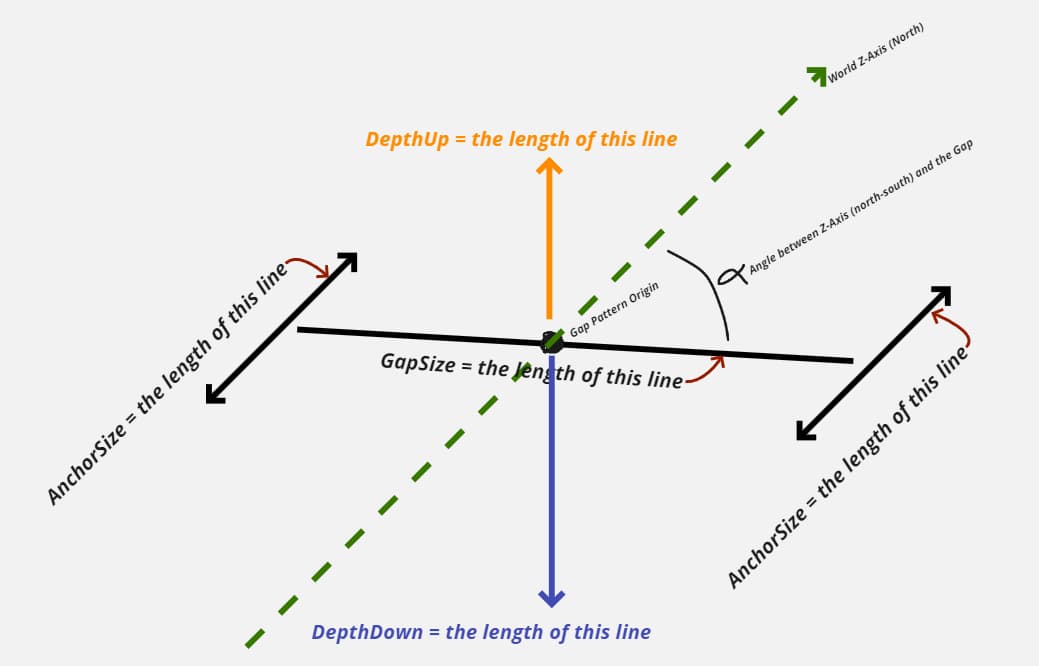
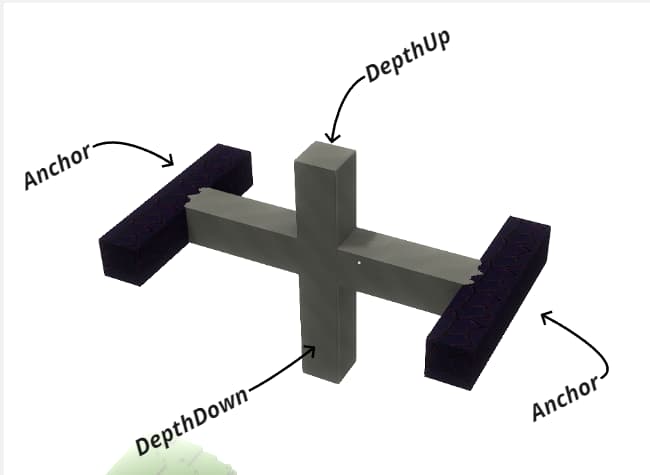
Validates if presented with a gap. In this context a gap is some sort of space between two anchors. You must define the space’s valid material type with the GapPattern parameter and the anchors’ valid material types with the AnchorPattern parameter. The GapSize is measured in blocks and represents the distance between the two anchors. The AnchorSize is also measured in blocks and represents the size of the “wall” that is checked when validating the anchors. You can use the DepthUp and DepthDown parameters to ensure that there is enough space under and/or above the Gap’s origin. The diagram below shows the underlying structure of the Gap Pattern.
Below is a block-build of the diagram above to show the blocks that a typical Gap Pattern would check. The grey blocks would be checked by the GapPattern and the black blocks would be checked by the AnchorPattern.
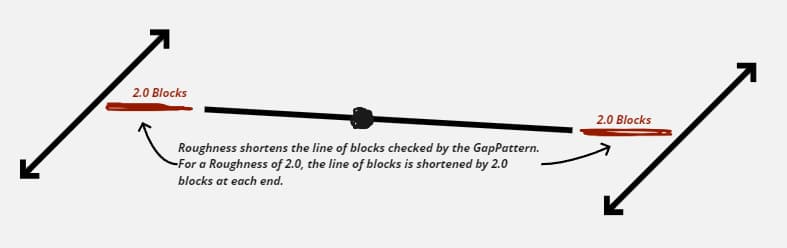
Setting an AnchorRoughness higher than 0.0 allows non-flat walls to validate as anchors. You should try increasing this value if you don’t get enough matches. The value of this field is also measured in blocks, and is used to trim the ends of the gap check. The diagram below shows that.
Parameters:
| Name | Type | Description |
|---|---|---|
| GapSize | decimal number (>= 0.0) | Determines the distance in blocks between the two anchors forming the gap. |
| AnchorSize | decimal number (>= 0.0) | Determines the size in blocks of the anchor. See the diagrams above for a visual representation. |
| AnchorRoughness | decimal number (>= 0.0) | Determines how strict the anchor checking is. Higher values mean less strict. A good starting point is 1. |
| DepthDown | integer (>= 0) | Determines the depth of the gap downward in blocks starting at the origin. |
| DepthUp | integer (>= 0) | Determines the depth of the gap upward in blocks starting at the origin. |
| Angles | list of decimal numbers | Angles in degrees. An angle of 0 is the Z-axis, and an angle of 90 is the X-axis. |
| GapPattern | Pattern slot | Used to validate every block of the gap and depths. |
| AnchorPattern | Pattern slot | Used to validate every block of the anchors. |
Cuboid
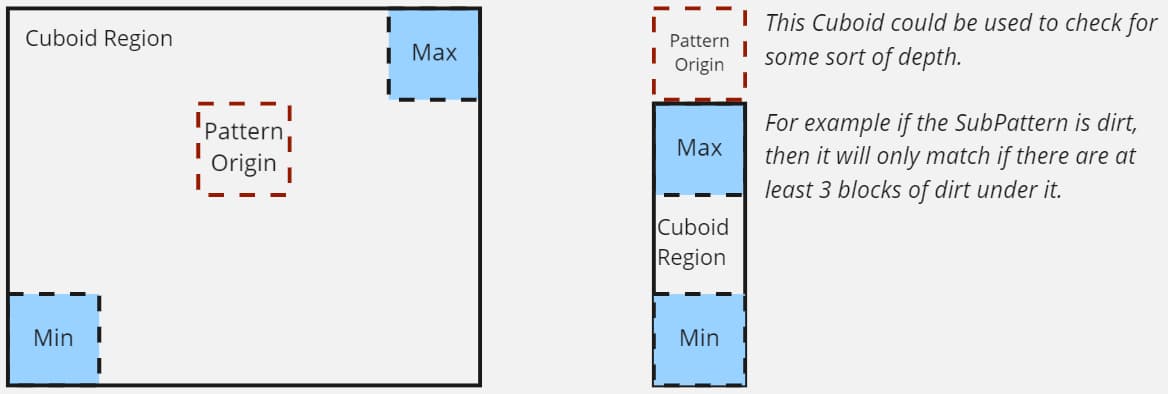
Defines a cuboid region relative to the Pattern’s origin. The region is anchored by Min and Max inclusive points. This is similar to the shape of a creative Selection Tool. The SubPattern is tested against every position inside the cuboid. The Cuboid Pattern validates only if all the inner positions are validated by the SubPattern.
Below is a 2D representation of this 3D Cuboid Pattern.
Parameters:
| Name | Type | Description |
|---|---|---|
| Min | 3D point | Inclusive minimum point of the cuboid relative to the Pattern’s origin. |
| Max | 3D point | Inclusive maximum point of the cuboid relative to the Pattern’s origin. |
| SubPattern | Pattern slot | The Cuboid uses this Pattern to validate the positions inside itself. |
And
Logical operation that validates only if all the Patterns in its list also validate.
Parameters:
| Name | Type | Description |
|---|---|---|
| Patterns | list of Pattern asset slots |
Or
Logical operation that validates if at least one of the Patterns in its list validates.
Parameters:
| Name | Type | Description |
|---|---|---|
| Patterns | list of Pattern asset slots |
Not
Logical operation that validates only where the nested Pattern does not validate.
Parameters:
| Name | Type | Description |
|---|---|---|
| Pattern | Pattern asset slot |
FieldFunction
This Pattern validates only if the provided Density field at the position is within the specified delimiters. In combination with an And and Or pattern, this Pattern provides more control over the valid positions.
Important: because this Pattern queries a noise field, it can be expensive if placed high in the hierarchy. I recommend setting your Pattern structure such that this Pattern is the last to be tested. The diagram below shows examples of that.
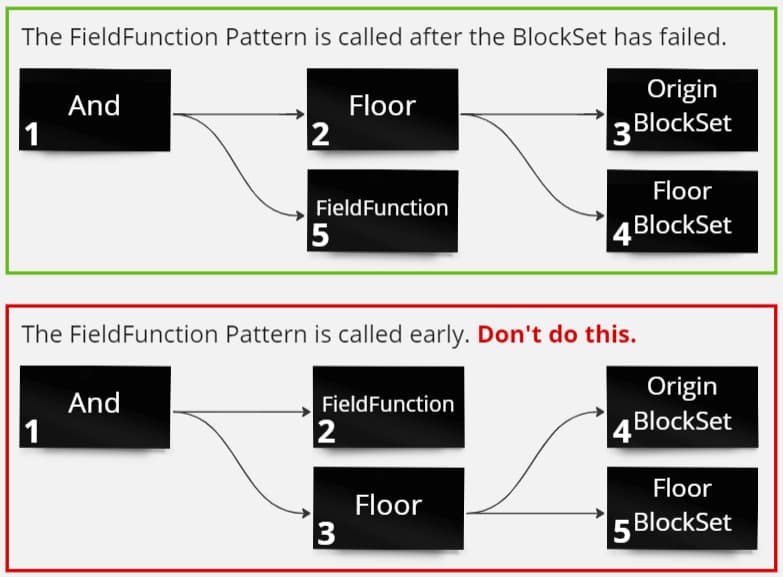
In the green box, the FieldFunction Pattern runs only on positions with a floor. In the red box, the FieldFunction Pattern runs on every position. The difference between the two scenarios is significant.
Parameters:
| Name | Type | Description |
|---|---|---|
| FieldFunction | slot for a noise function RootNode | |
| Delimiters | list of noise value delimiters | |
| Delimiters[].Min | decimal number | Lower inclusive bound of the delimiter. |
| Delimiters[].Max | decimal number | Higher exclusive bound of the delimiter. |
Imported
Imports an exported Pattern.
Parameters:
| Name | Type | Description |
|---|---|---|
| Name | string | The exported Pattern. |